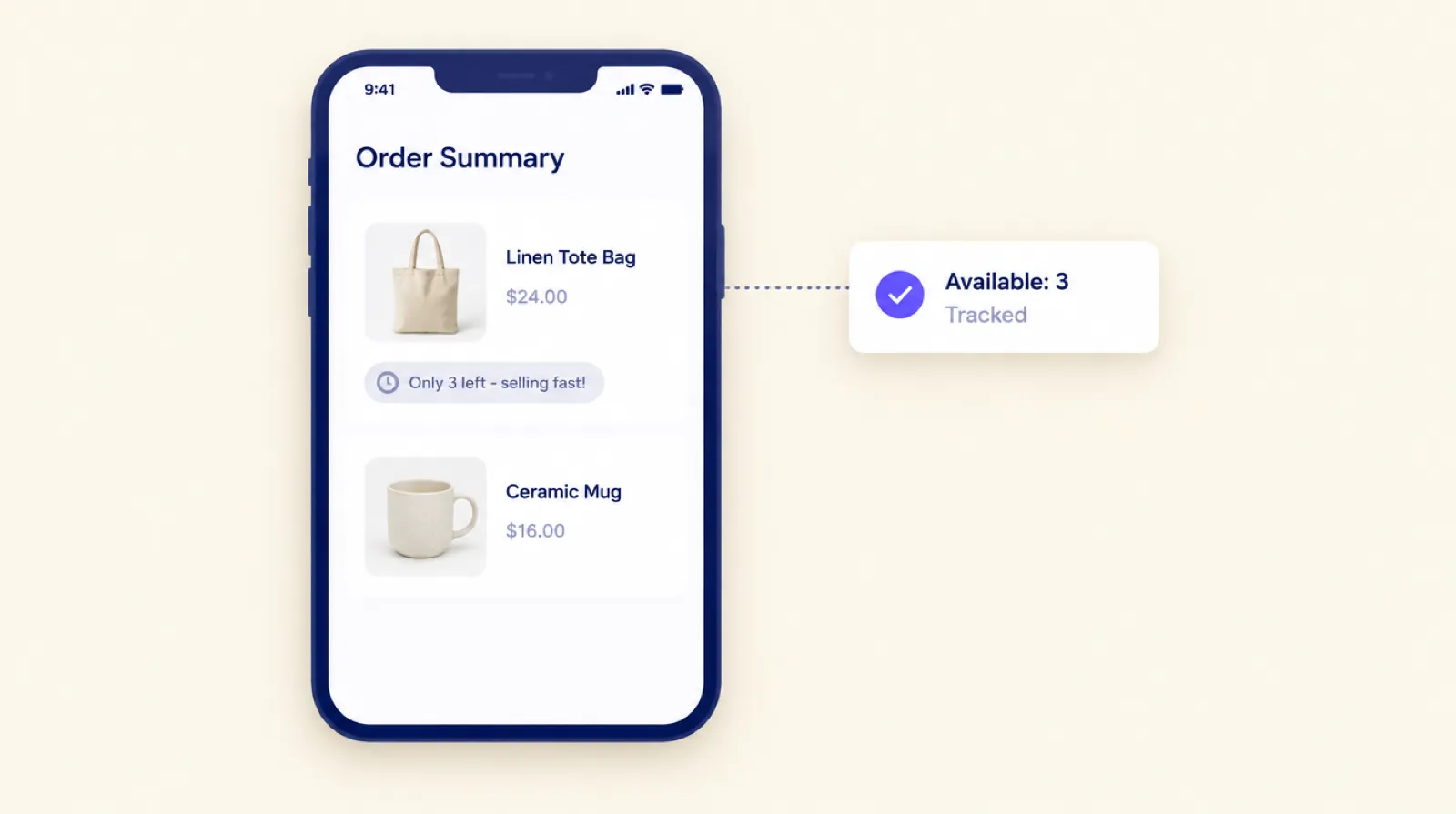
"Only 3 left" under an item in checkout can stop a buyer from leaving to think about it. When the number is real, that's useful information. When it's made up, regulators in the US, UK and EU treat it as misleading. Researchers have found fake stock counters on Shopify stores, and the UK now fines businesses directly for misleading sales pressure. Here's what the rules say, and how to show a stock level in checkout that you can stand behind.
What researchers found on shopping sites
In 2019 a Princeton team crawled about 53,000 product pages on about 11,000 shopping sites, looking for dark patterns (Mathur et al., "Dark Patterns at Scale"). They found 632 low-stock messages. On 17 sites the messages were provably fake: on 16 the count dropped on a fixed schedule whatever anyone bought, and one site generated random numbers. Eight of those 17 used third-party scripts the paper identifies as popular Shopify plugins.
Most of the low-stock messages they found weren't shown to be fake, and 17 sites is a small number. It does show one way fake scarcity gets onto Shopify stores: a plugin shows a number that has nothing to do with your inventory.
What the rules say
This is a summary, not legal advice. If you sell into these markets and aren't sure about a message, ask a lawyer.
United States
The FTC's 2022 staff report Bringing Dark Patterns to Light names "False Low Stock Message" as a scarcity dark pattern: saying inventory is low when it isn't. It uses "Only 1 left in stock" as its example. The same list includes false high-demand messages, countdown timers that reset, and false limited-time messages. The report treats these as deceptive practices under Section 5 of the FTC Act.
United Kingdom
The Digital Markets, Competition and Consumers Act 2024 lists practices that are always unfair. They include giving materially inaccurate information about the availability of a product, and falsely saying a product will only be available for a limited time to rush a decision. Since April 6, 2025 the CMA can decide breaches itself and fine up to 10% of global turnover.
It has started using those powers. On October 14, 2026 it fined three firms about £6 million. Wayfair's £4.8 million fine was for daily and 24-hour deals with countdown timers, where many items stayed at the same price or less after the deadline. That case was about time pressure, not stock counts, but the same law covers both.
European Union
Annex I of the Unfair Commercial Practices Directive bans falsely stating that a product will only be available for a very limited time to rush a decision. The Commission's 2024 review of EU consumer law named dark patterns among the most harmful online practices. A Digital Fairness Act is being prepared to deal with them, but it hadn't been proposed as of October 2026.
What makes a stock message honest
- The number is your real inventory for that exact variant, read from your store, not a script that counts down.
- It only appears when stock really is low. A badge under every item stops meaning anything, and it looks like a trick even when it's true.
- The words claim no more than the number does. "Only 3 left" is a fact. "Selling fast!" is a claim about demand. Use it only if the item really is selling fast.
- There's no number when there's no limit. If an item is made to order, or you keep selling when it's out of stock, there's nothing honest to count.
How the stock badge in Smart Checkout Widgets works
The stock urgency widget adds a small badge under each item in the checkout order summary when that variant's stock is at or below a number you choose.
- The count is the variant's inventory in Shopify, across your locations. It's read when checkout loads and is at most about a minute old.
- Variants that don't track inventory never show a badge, and neither do variants set to keep selling at zero.
- Items with plenty of stock show nothing. Free gifts added by the app are skipped.
- If the app can't get a clear answer from Shopify, it shows no badge at all rather than a guess.
The default message is "Only {{count}} left - selling fast!", and you can change it. If you can't back up "selling fast" for every item that might show the badge, change the message to "Only {{count}} left" or "{{count}} left in stock".
Setting the threshold for Black Friday
The threshold is the stock level at which the badge appears, from 1 to 1,000. The default is 10. It's one number for every item in checkout, so pick it from how fast your best sellers go:
- If 10 units is a normal day's stock for your best sellers, a threshold of 10 puts a badge on them all day, and it means nothing. Lower it.
- For limited runs and drops, a higher threshold is fine, because the stock is genuinely small.
- During a sale, stock falls faster, so a badge that rarely showed in October may show a lot in late November. Check a few checkouts on the day.
Because the count is live, it falls as people buy. On a busy day an item can sell out between a buyer seeing "Only 3 left" and paying.
If you also let customers swap sizes after checkout, swaps only offer variants that are in stock, so a swap can't push a low-stock variant below zero.
Set it up
- In Smart Checkout Widgets, open Widgets and create a Stock urgency widget. Set the threshold, message, colour and icon, and save.
- In Shopify, go to Settings > Checkout > Customize. Add the Smart Checkout Widget block under Order summary > Items in cart, pick your widget in the block settings, and save.
The badge runs on the checkout page, which Shopify only opens to apps on Shopify Plus. It's part of the Pro plan at $99 a month with unlimited orders. The stock urgency docs have the details.
Frequently asked questions
Is it legal to show "only 3 left" in checkout?
Showing a true stock count is fine. What the FTC, the UK's DMCC Act and the EU's Unfair Commercial Practices Directive object to is a false one: low-stock claims that aren't true, or false claims that something is only available for a limited time. This is a summary, not legal advice.
Can Shopify show stock levels in checkout?
Not on its own. Themes can show stock on product pages, but checkout has no built-in stock message. On Shopify Plus, a checkout app such as Smart Checkout Widgets can add a badge under each item using your real inventory.
Where does the stock number come from?
From the variant's inventory in Shopify, across your locations. It's read when checkout loads and is at most about a minute old. Variants that don't track inventory, or keep selling at zero, never show a number.
Should the message say "selling fast"?
Only if it's true for the items that show the badge. If not, use a message that only states the count, such as "Only {{count}} left".
What threshold should I use?
Lower than the stock your best sellers normally hold, so the badge only appears when stock is genuinely low. The default is 10, and you can set anything from 1 to 1,000.