Hide Cash on Delivery when it costs you
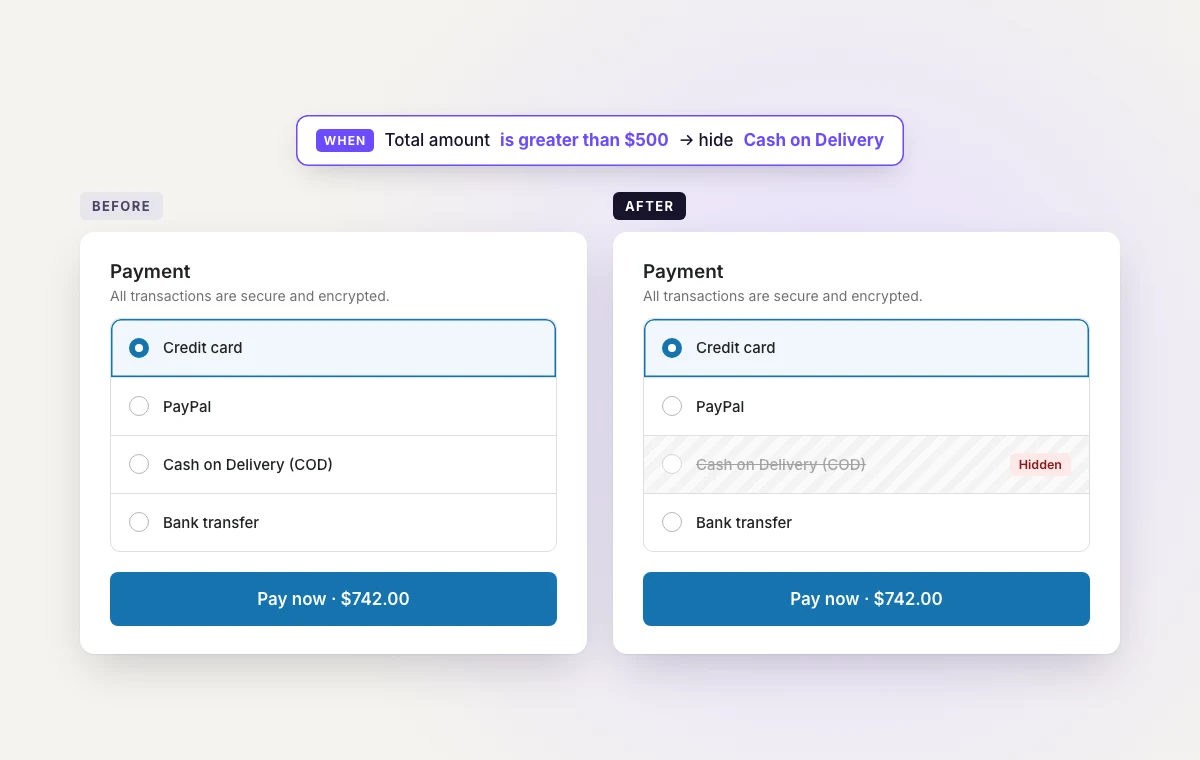
Large orders, other countries, guest checkouts — pick the case and COD simply isn't offered. Hide, rename or reorder any payment method.
How to hide Cash on DeliveryHide Cash on Delivery when it costs you, put delivery times in shipping rate names, and turn the Thank you page into your next sale — on Basic, Shopify, Advanced or Plus. On Plus, add free gifts and upsells inside checkout too.
Start from a ready-made payment or shipping rule, add blocks to your Thank you page, and — on Plus — run gifts and upsells in checkout, all from one app.
 Smart Checkout
We only surface claims backed by the public app listing and product capabilities — no invented conversion lifts or vanity metrics.
Payment rules, shipping rules and Thank you page blocks work on any Shopify plan. Shopify only opens the checkout page itself to Plus — that is where gifts and upsells live.
Large orders, other countries, guest checkouts — pick the case and COD simply isn't offered. Hide, rename or reorder any payment method.
How to hide Cash on DeliveryPut delivery times in the name, hide rates an order can't use, and show the best one first — by weight, product tag, postcode or day.
Shipping rules guideTrust badges, banners, custom content and FAQs on the Thank you and Order status pages every customer sees.
Thank you page guideA one-question survey on the Thank you page asks buyers what led them to purchase. Results shows each answer with the revenue behind it, including the AI assistant sales analytics often files under direct.
Post-purchase survey guideWhen the cart has this, offer that. Match products, collections, tags or cart total, give each offer its own discount, and import a long list from a CSV.
Upsell rules guideConnect an assistant with a private URL and ask why a payment method is hidden or how a gift did. It can only look until you give it permission to edit.
AI assistant docsWrong address, wrong size, one too many: customers change it on the Thank you and Order status pages, inside a window you set, with refunds Shopify calculates.
Order editing guideSurface gift offers at checkout when thresholds are met — tied to real discount logic, not manual codes merchants have to babysit.
Read automatic gifting guideOffer multiple gift items and let customers pick one at checkout for a more relevant promotional experience.
Why choice beats one-size-fits-allCombine reward mechanics with upsells, banners, and payment messaging so checkout feels polished right before conversion.
Checkout AOV strategy guidePayment & shipping rules and Thank You / Order Status widgets work on every Shopify plan. Checkout-page widgets need Shopify Plus. View full pricing on Shopify
or $278.40/year · save 20%
or $566.40/year · save 20%
7-day free trial
Start 7-day trialor $950.40/year · save 20%
7-day free trial
Start 7-day trialAll charges are billed in USD. Recurring charges are billed every 30 days, or yearly at a 20% discount. Starter is free and needs no subscription. Growth, Advanced and Pro include a 7-day free trial.
Guides on upsells, BOGO, trust content, extensibility, Thank You / Order Status widgets, and gift strategy.
How automatic gifting simplifies campaign setup and creates a cleaner promotional experience.
Read article →Why shopper-selected rewards can increase perceived value at checkout.
Read article →Connect gifts, upsells, and trust signals into one checkout system.
Read article →How to add checkout upsells on Shopify Plus without cluttering the final step — timing, relevance, a…
Read article →Run BOGO and automatic discount campaigns in Shopify checkout without coupon codes — rules, stacking…
Read article →Extend checkout campaigns on Thank You and Order Status pages — without repeating the same upsell.
Read article →No. Payment and shipping method rules and Thank You and Order Status page widgets work on every Shopify plan. Widgets on the checkout page itself (gifts, upsells, custom fields, trust badges in checkout) need Shopify Plus, because Shopify only allows checkout-page customization on Plus.
Starter is free to install and covers up to 100 orders a month with every widget and rule type included. Growth, Advanced and Pro come with a 7-day free trial.
Every plan includes all 13 widgets and all shipping and payment rules. Starter, Growth and Advanced differ only by monthly order volume: up to 100, up to 1,000, and unlimited. Pro adds self-serve order editing on every Shopify plan, plus low-stock badges in checkout and the checkout branding editor for Shopify Plus stores. Yearly billing saves 20%.
Yes, by asking. The post-purchase survey puts one question on the Thank you page, such as "What led you to purchase today?", with an AI assistant among the answers. The Results page shows how many buyers picked each answer and the revenue of their orders. It works on every Shopify plan from Basic up and is included on every app plan. See the survey docs.
You set a rule such as a spend threshold or specific products in the cart. When the cart meets it, the app adds the gift product at checkout and discounts it to free. No code is needed. Gifts can also be tied to a discount code, and you can let the customer choose from several gifts with a cap on how many they take.
Yes. Rules run as Shopify Functions and can hide, rename or re-order delivery options and payment methods based on cart total, quantity, weight, customer tag, order count, product tag, collection, country, province, city, postcode, day of week or date. Shipping rules can be scoped to shipping rates, local delivery, carrier pickup points, local pickup locations or retail.
No app can. Shopify allows hiding individual pickup locations but not the Pick up delivery method itself.
The app pauses when a store goes over its plan's monthly order limit. Widgets, gifts, upsell discounts, and shipping and payment rules all switch off together. Upgrading re-enables them automatically, and they also switch back on when a new month starts.
No, and it does not need to. The app uses Shopify checkout extensibility, the supported replacement for checkout.liquid, so nothing breaks when Shopify updates checkout.
Yes. Ask Sidekick in your Shopify admin why a payment or shipping method is missing, and it reads your Smart Checkout Widgets rules and tells you which one is responsible. It can also list your gift campaigns and widgets and suggest a rule template. Sidekick only reads: changes happen in the app when you press Save. How it works.
Install free, open a template, press Save — it's live at checkout on any Shopify plan. On Plus, launch gifts and upsells from the same app.